---
updatedAt: 2026-10-26T10:50:49.000Z
agentTools:
projectIndex: https://docs.umbrellacost.io/llms.txt
---
# Analytics - Top Consumers
## Overview
The Top Consumers tab answers the question every FinOps lead and engineering manager asks when the AI bill goes up: *who's spending, on what, and where?*
Instead of a single leaderboard, this tab breaks consumption into ten ranked lists - each showing a different dimension of your AI usage. Every list highlights the top contributors so you can quickly pinpoint where optimization efforts will have the biggest impact.
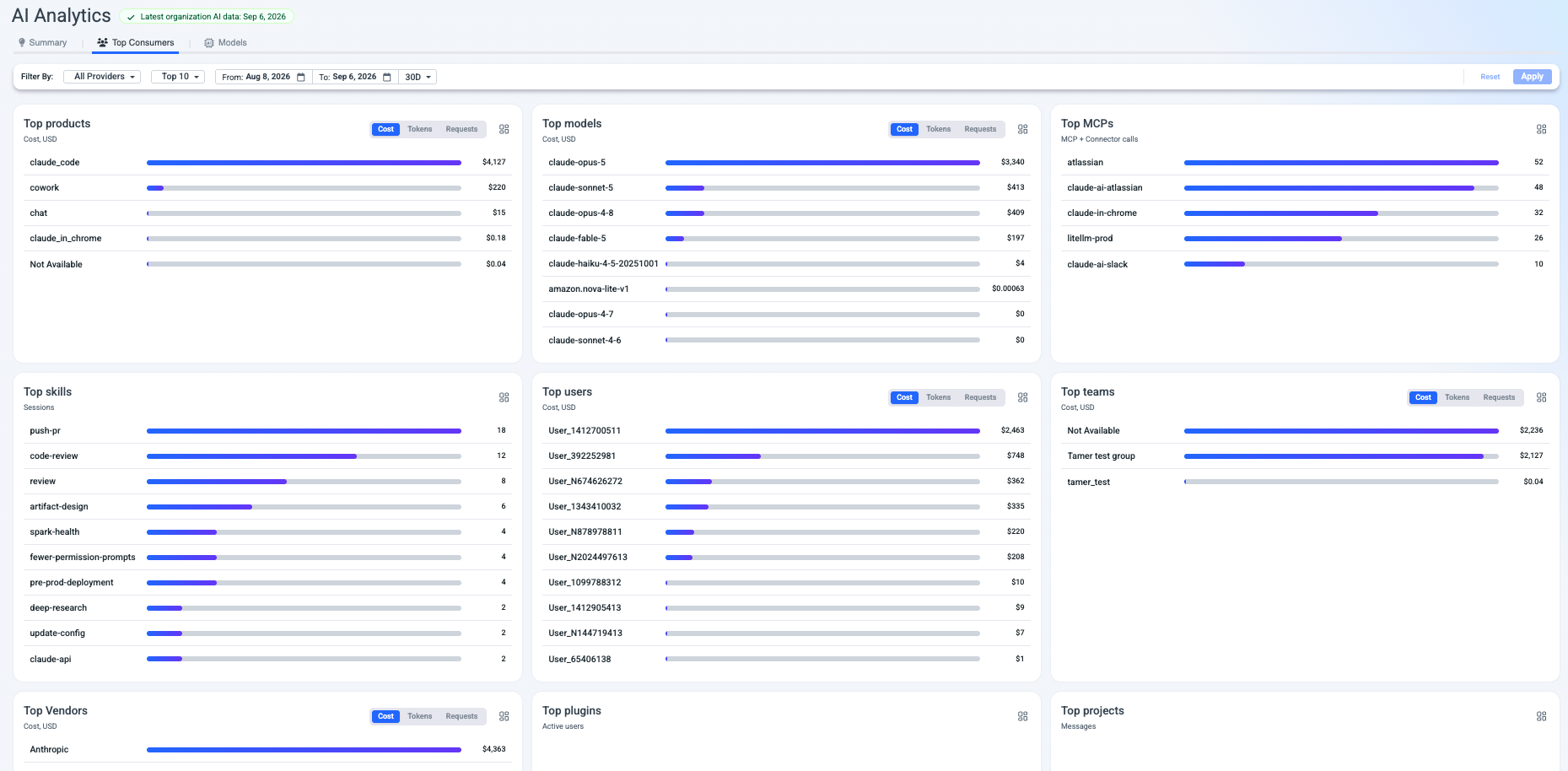
## How the rankings work
All rankings respect the shared filter bar at the top of the page:
| Filter | What it does |
| ----------------- | ----------------------------------------------------------------- |
| **Filter By** | Narrow to a specific AI provider. Defaults to **All Providers**. |
| **Top N** | Controls how many entries each card shows. Defaults to **Top 10** |
| **From / To** | Date range. |
| **Period preset** | Quick-select (e.g. **30D**). |
Most cards offer **Cost**, **Tokens**, and **Requests** toggles so you can view the same ranking in different units. Cards without these toggles use a fixed metric noted in their subtitle.
### Top products
Ranks the AI products (client applications) driving your spend. This tells you which tools in your AI stack are consuming the most resources - for example, whether coding agents or chat interfaces dominate your bill.
Products visible in the screenshot include claude\_code, cowork, chat, and claude\_in\_chrome.
### Top models
Ranks the specific AI models by cost, token volume, or request count. This is where you see whether your spend is concentrated on a premium model or spread across a range - critical for deciding whether to set model-routing policies or negotiate volume pricing.
Models span multiple providers and generations (e.g. claude-opus-5, claude-sonnet-5, amazon.nova-lite-v1), giving you a cross-provider view in one list.
### Top MCPs
Ranks MCP (Model Context Protocol) connectors and integrations by call count. The subtitle reads "MCP + Connector calls," so each entry reflects how many times that connector was invoked during the period.
This helps you understand which external integrations are most active. High call counts on a connector might indicate heavy workflow automation, or might signal an integration making redundant calls worth optimizing.
### Top skills
Ranks AI skills by session count. Skills are reusable instruction sets that guide how Claude handles specific types of work (e.g. push-pr, code-review, artifact-design).
This view shows which skills your team relies on most, helping you prioritize skill maintenance and identify candidates for optimization.
### Top users
Ranks individual users by AI consumption. Users may appear as hashed identifiers (e.g. User\_1412700511) or by name, depending on your identity configuration.
Toggle between Cost, Tokens, and Requests to understand whether a user's high spend comes from volume (many requests) or intensity (large prompts, expensive models).
### Top teams
Ranks teams by AI consumption. This is your chargeback and showback view - see which teams are driving the AI bill and whether spend aligns with their expected usage patterns.
### Top Vendors
Ranks AI vendors (providers) by spend. In a multi-provider environment, this shows the cost split at the vendor level - for example, Anthropic vs AWS.
### Top plugins
Ranks plugins by active user count.
### Top projects
Ranks projects by message count.
### Top artifacts
Ranks artifact types by generated count. Artifacts are the files and outputs Claude creates during conversations - documents, code files, HTML pages, and other deliverables. This shows which output types your team generates most.