---
updatedAt: 2026-10-15T08:57:07.000Z
agentTools:
projectIndex: https://docs.umbrellacost.io/llms.txt
---
# Fiscal Year Calendar Configuration
> 📘 Location
>
> **Organization → Settings → Fiscal Calendar**
# Overview
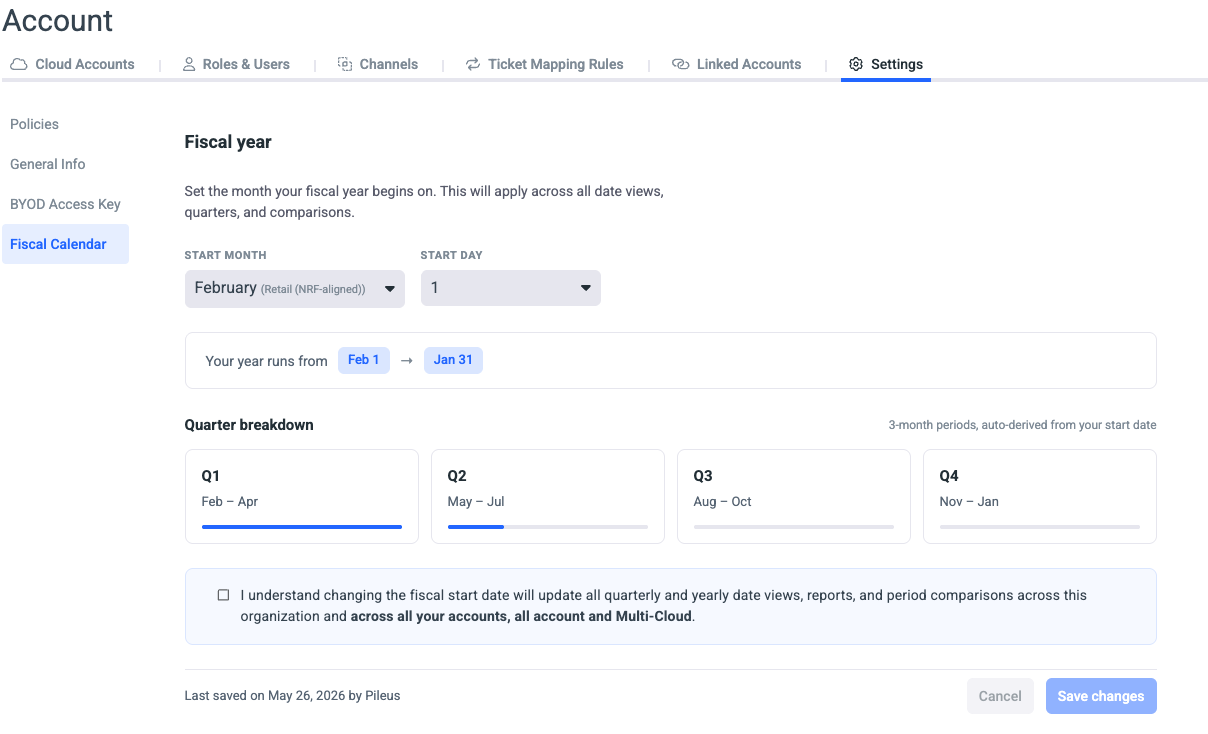
The Fiscal Calendar setting lets administrators define when their organization's fiscal year begins. Once configured, the chosen start date drives every quarterly and yearly view across Umbrella — quarters, period comparisons, and reporting ranges all re-align to the organization's accounting calendar instead of the default January–December calendar year.
# Who can use it
Account administrators with the Organization Settings permission. Changes apply organization-wide.
# What you configure
* **Start Month**: The month your fiscal year begins (January through December).
* **Start Day**: The day of the chosen month (1–31). The list adapts to the selected month's length, so February tops out at 29 and April at 30.
> 📌 Confirmation is required before saving the changes
>
> 
# Affected entities
> 📌 The changes will be applied in each Account, All Account and Multi-Cloud
When the fiscal start date changes, the following surfaces re-align their date ranges, quarters, and period comparisons:
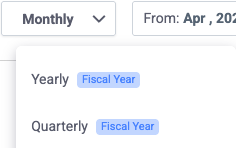
* **Cost & Usage Explorer/Assets**: Once Quarterly or Yearly is selected in the granularity dropdown, indicate that the Fiscal Calendar is enabled.
* Dashboards
* Reports
* Budget Summary
* Waste Detector
* My Commitments