
Unit Economics Permissions
User Management Permissions
Overview
Access to Unit Economics is governed in two ways: feature permissions assigned to a role control who can configure and view Unit Economics pages, and data access controls which metric data a user can see. Umbrella's built-in KPIs are not permission-gated.
Permissions
Two permissions govern the Unit Economics pages and are assigned per role.
| Permission | Controls |
|---|---|
| Metric Pipelines | Access to the Metric Pipelines and Metrics pages
|
| Unit Economics KPIs | Access to the KPI Builder and visibility of customer/MSP created KPIs in the Cost & Usage Explorer / Assets
|
| Telemetry Pipeline | Access to pipeline metrics data in Cost & Usage Explorer, Assets, and Business Mapping is controlled by assigning pipelines to a role
|


Metric data access
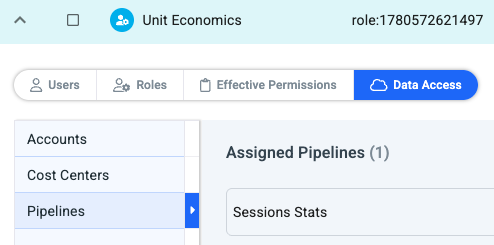
Metric visibility across the platform is granted through the data access assigned to a role. Telemetry pipelines are a data container - in the same way cost centers and reseller customers are - so Pipelines is now available as a data access resource alongside your existing data access types.
When you configure a role's data access, grant access to the specific pipelines that role should see. A user sees metrics only from the pipelines their role has data access to; pipelines outside that scope, and the metrics they contain, are not visible.
Umbrella KPIs vs Custom KPIs
Umbrella's built-in KPIs are not tied to any permission. They behave like any cost or usage data and are available to all users. Custom KPIs created in the KPI Builder are governed by the Unit Economics KPIs permission described above.
MSP scenarios
- MSP users can inject Unit Economics telemetry on the MSP organization.
- MSP users can inject telemetry into a customer organization on the customer's behalf.
- MSP customers can inject telemetry into their own customer organization.