
Understand the Cost & Usage filters
The Cost and Usage Explorer is a powerful tool within the Umbrella Cloud Cost management platform that empowers you to understand and optimize your cloud expenses. By harnessing the filtering and grouping capabilities of this tool you can break down your costs into granular details and uncover valuable insights about your cloud consumption.
In this article, you will find all the dimensions within the Cost and Usage Explorer, with a detailed understanding of each and how they empower you to make informed decisions.
AWS
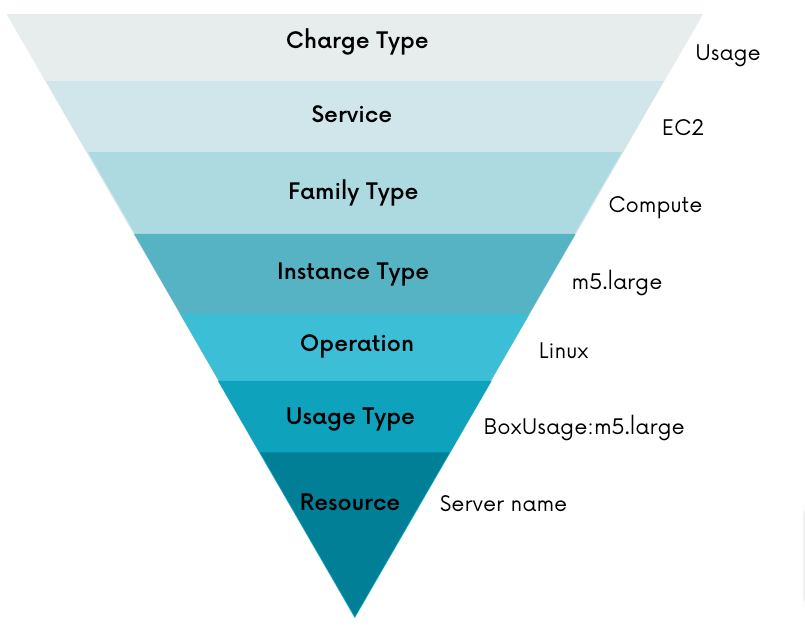
Terminology and drill down hierarchy:
Note: the hierarchy can change between different services
Azure
Click here for Azure dimensions
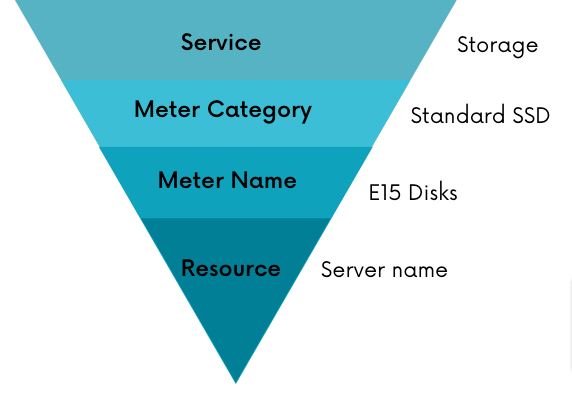
Terminology and drill down hierarchy:
GCP
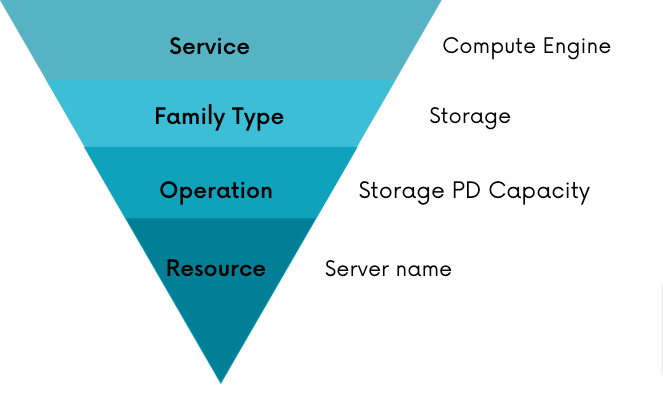
Terminology and drill down hierarchy:
AWS dimensions
| Dimension | Explanation | Example Values | Equivalent name on AWS Cost Explorer |
|---|---|---|---|
| Cost Type |
| Cost, Discount, Credit, Refund | |
| Region | The geographic areas where AWS hosts your resources. | EU (Frankfurt) eu-central-1 | Region |
| Linked Account | The member accounts in an organization. | Linked Account | |
| Service | AWS services products. | EC2 | Service |
Cost Center
| Umbrella feature that enables you to define business units of linked accounts (More info ). | ||
| Tags | The value of the tag key. | If the tag is "Department": "R&D", the "R&D" is the selected value. | Tags |
| Quantity Type | Unit of measurement used to quantify a specific resource or service usage. | Bytes, Hours, Requests, Other | |
| Virtual Tags | Umbrella feature that enables you to combine several tag keys together (More info ). | ||
| Operation | Detailed breakdown of family type. | Linux, GP2, etc. | |
| Purchase Option | The payment method you choose for an eligible AWS service. | On-Demand, Reserved, Savings Plans, Spot | Purchase Option |
| Family Type | Grouping of services. | Compute, EBS etc. | |
| Instance Type | Specifies the type of the instance used, defined by the combination of CPU, memory, storage, and network capacity. | m5.large | |
| Sub Service | Breakdown of Data Transfer. | Data Transfer: AWS Amplify | |
| Charge Type | Types of charges or fees. | RI Fee, EDP Estimated, etc. | Charge Type |
| Filter Group | Umbrella feature that enables you to create a view based on Cost & Usage filters (More info). | ||
| Business Mapping | Umbrella feature that enables cost calculation across different product segments, helping to facilitate data-driven decisions on pricing, renewal strategies, and more (More info ). | ||
| Usage Type | Each service uses a different usage type and region to measure the usage of a particular resource. | AFS1-DataTransfer-Out-Bytes (GB) | Usage Type |
| Availability Zone | Geographically isolated data center within a region. | ap-east-1a | Availability Zone |
| Resource | The unique identifier for your resource. | Resource | |
| Enrichment Tags | Umbrella feature that enables you to add additional details associated with each linked account (More info ). | ||
| Normalization Factor | normalization factor that AWS applies to each instance size (Learn More ). | ||
| Platform | Describes the operating system or platform running on the instance. | Linux | Platform |
| DB Engine | Indicates the database engine used in an RDS instance. | MySQL | Database Engine |
| Billing Entity | Identifies whether your invoices or transactions relate to the AWS Marketplace or to other AWS services. | AWS Marketplace | Billing Entity |
| Legal Entity | The Seller of Record of a specific product or service. | Amazon Web Services, Inc | Legal Entity |
| Payment Option | Specifies the payment plan. | All Upfront | |
Invoice ID
| The Invoice ID helps in reconciling the AWS Cost and Usage Report with the actual invoice issued by AWS for that billing period. | ||
| Commitment ARN | The ARN of your Commitments (Savings Plans or Reservations). |
Azure dimensions
| Dimension | Explanation | Example Values | Equivalent name on AWS Cost Explorer |
|---|---|---|---|
| Cost Type |
| Cost, Discount, Credit, Refund | |
| Subscription | The member accounts in an organization. | Subscription | |
| Resource Group | Logical unit where you can deploy and manage your resources such as databases and storage accounts. | Resource Group name | |
| Meter Category | Grouping of services. | Storage | Meter Category |
| Sub Meter Category | Specific details about the Meter Category. | Backup Storage | Meter SubCategory |
| Region | The geographic areas where Azure hosts your resources. | ap-southeast | Location |
| Service | Azure products. | Virtual Network, Load Balancer, etc. | Service name |
| Meter Name | Detailed breakdown of Sub Meter Category. | 4 vCPU | Meter |
| Purchase Option | The payment method you choose. | On-Demand, Reserved, Savings Plans, Spot | Pricing Model |
Line Type
| Type of Charge Categories. | ||
| Quantity Type | Unit of measurement used to quantify a specific resource or service usage. | Bytes, Hours, Requests, Other | |
Cost Center
| Umbrella feature that enables you to define business units of linked accounts (More info ). | ||
| Tags | The value of the tag key. | If the tag is "Department": "R&D", the "R&D" is the selected value. | Tags |
| Filter Group | Umbrella feature that enables you to create a view based on Cost & Usage filters (More info). | ||
| Business Mapping | Umbrella feature that enables cost calculation across different product segments, helping to facilitate data-driven decisions on pricing, renewal strategies, and more (More info ). | ||
| Usage Type | Types of charges or fees. | RI fee | |
| Resource | The unique identifier for your resource. | Resource | |
| Enrichment Tags | Umbrella feature that enables you to add additional details associated with each linked account (More info ). | ||
| Benefit | The name of the purchased commitment. | Benefit | |
| Publisher Name (for FOCUS exports only) | Name of the entity that produced the resources or services that were purchased. | Microsoft | |
| Publisher Category (for FOCUS exports only) | Indicates whether a charge is from a cloud provider or third-party Marketplace vendor. | Cloud Provider | |
| Charge Category (for FOCUS exports only) | The highest level classification for the type of charge that the billing row represents. | Usage | |
| Partner Credit Rate (for FOCUS exports only) | The rate earned based on the Cloud Solution Provider (CSP) Partner Earned Credit (PEC) applied. | 0.15 | |
| Azure Cost Center (for FOCUS exports only) | Cost Center, as defined in the Azure console | ||
| Azure Invoice ID (for FOCUS exports only) | Unique identifier for the invoice the charge was billed on. | ||
| Invoice Section ID (for FOCUS exports only) | Unique identifier for the MCA invoice section or EA department. | ||
| Invoice Section Name (for FOCUS exports only) | Display name for the MCA invoice section or EA department. |
GCP dimensions
| Dimension | Explanation | Example Values | Equivalent name on AWS Cost Explorer |
|---|---|---|---|
| Cost Type |
| Cost, Discount, Credit, Refund | |
| Region | The geographic areas where GCP hosts your resources. | us-west1 | Locations |
| Projects | The member accounts in an organization. | Projects | |
| Service | GCP products. | Service | |
| Operation | Detailed breakdown of family type. | E2 Instance Core running in EMEA | |
| Family Type | Grouping of services. | Compute, Network, etc. | |
Cost Center
| Umbrella feature that enables you to define business units of linked accounts (More info ). | ||
| Labels | The value of the tag key. | If the tag is "Department": "R&D", the "R&D" is the selected value. | Labels |
| Cost Type Description | Types of charges or fees. | Discount, Promotion, etc. | |
| Filter Group | Umbrella feature that enables you to create a view based on Cost & Usage filters (More info). | ||
| Business Mapping | Umbrella feature that enables cost calculation across different product segments, helping to facilitate data-driven decisions on pricing, renewal strategies, and more (More info ). | ||
| Resource | The unique identifier for your resource. | Resource | |
| Enrichment Tags | Umbrella feature that enables you to add additional details associated with each linked account (More info ). |