
Pricing Page
Cloud Providers Pricing Visability
Overview
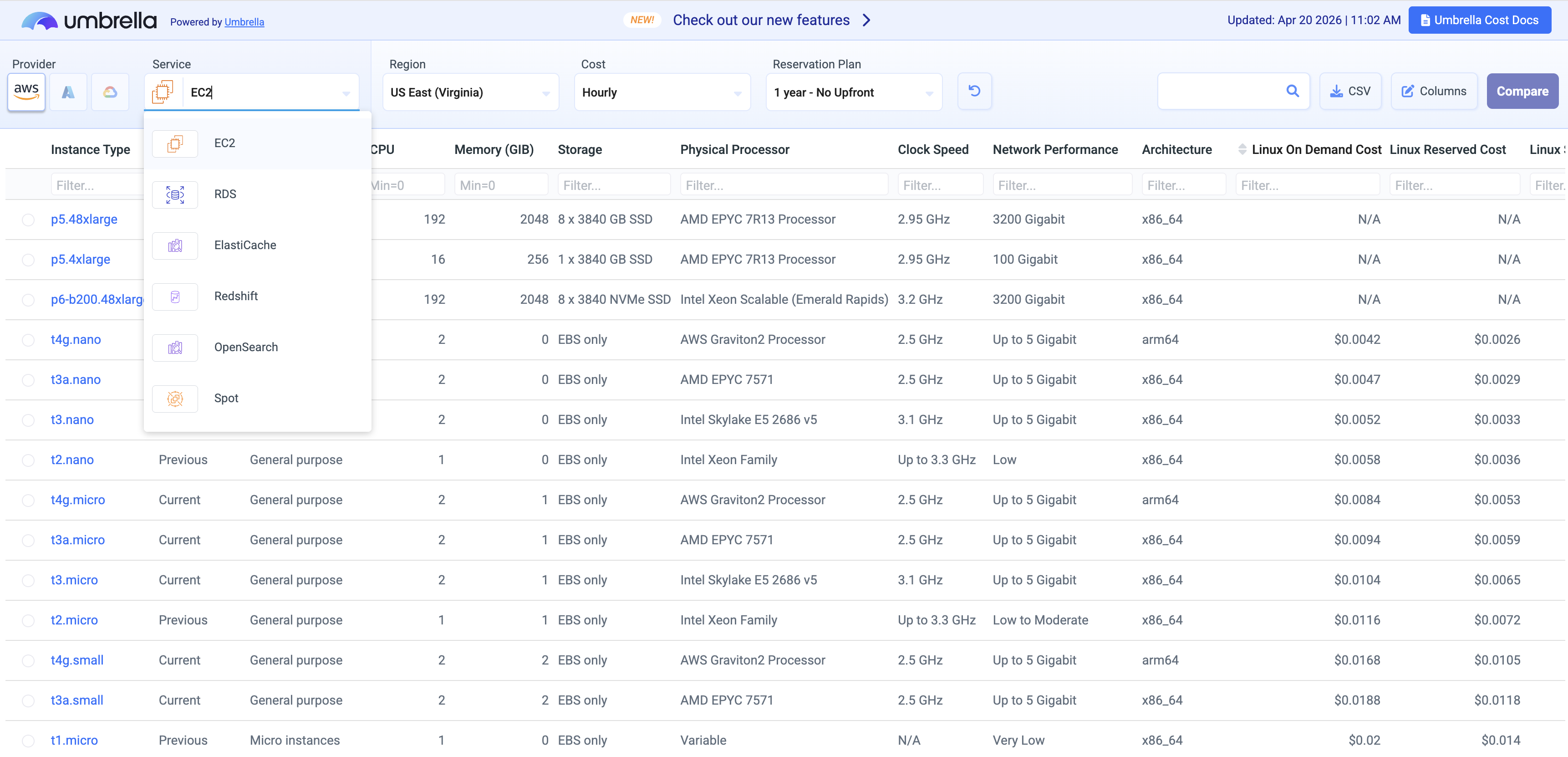
The Umbrella Cloud Pricing Page is a free, publicly accessible tool for exploring and comparing compute instance pricing across the three major cloud providers - AWS, Azure, and GCP - in a single unified view. It is designed to help FinOps practitioners, cloud architects, and engineers quickly evaluate costs across instance types, regions, payment models, and services without navigating each provider's native pricing console separately.
Key benefit:
- Compare pricing across all three major cloud providers and six AWS services from one page, covering on-demand, reserved, and spot pricing models.
- Pricing data reflects public list prices from AWS, Azure, and GCP and is updated on a daily basis by Umbrella.
Cloud Provider Coverage
| Provider | Branding | Services Covered |
|---|---|---|
| Amazon Web Services | AWS | EC2, RDS, ElastiCache, Redshift, OpenSearch, Spot |
| Microsoft Azure | Azure | Virtual Machines |
| Google Cloud Platform | GCP | Compute Engine VMs |
Navigation Structure
The page flows through three progressively deeper layers: provider/service selection → filtered results table → instance detail drill-down.
Layer 1 - Provider & Service Selection
The starting point is choosing a cloud provider and then a service within it. For AWS this means selecting from six services (see AWS Services below). For Azure and GCP, the primary service is virtual machine compute. This selection determines which instance families, regions, and pricing dimensions are available throughout the rest of the experience.
Layer 2 - Filtering & Scoping
After selecting a provider and service, a filter panel allows users to narrow down the results:
-
Region - Select the target deployment geography (e.g.,
us-east-1,East US,us-central1). Prices vary significantly by region, making this a critical input for accurate cost comparison. -
Instance Family / Category - Filter by performance profile: general purpose, compute-optimized, memory-optimized, storage-optimized, or GPU. Narrows the list to instance types suited to a specific workload.
-
vCPU and Memory - Filter by CPU core count and RAM to match workload requirements without over-provisioning.
-
Operating System - Choose between Linux and Windows. OS licensing is embedded in the displayed pricing, so this filter ensures accuracy.
-
Pricing Model - All major tiers are supported:
- On-Demand - hourly pay-as-you-go with no commitment; the baseline rate against which all discounts are measured.
- 1-Year Reserved / Committed Use - discounted rate for a 1-year term.
- 3-Year Reserved / Committed Use - deeper discount for a 3-year term.
- Spot / Preemptible - interruptible capacity at significant discounts.
For reserved tiers, payment structures are differentiated where applicable: No Upfront, Partial Upfront, and All Upfront.
Layer 3 - Instance Results Table
Filtered results are displayed as a sortable table. Each row represents a single instance type and shows:
| Column | Description |
|---|---|
| Instance type | e.g., m7i.large, D4s v5, n2-standard-4 |
| vCPU / Memory | Core count and GiB of RAM |
| Storage | Local disk type and capacity where applicable |
| Network | Network performance tier |
| On-Demand price | Baseline hourly rate |
| Reserved price | Discounted hourly rate for the selected term |
| Savings % | Effective discount vs. on-demand |
The table can be sorted by any column, enabling ranking by cost, memory-to-CPU ratio, or other attributes.
Instance Detail Drill-Down
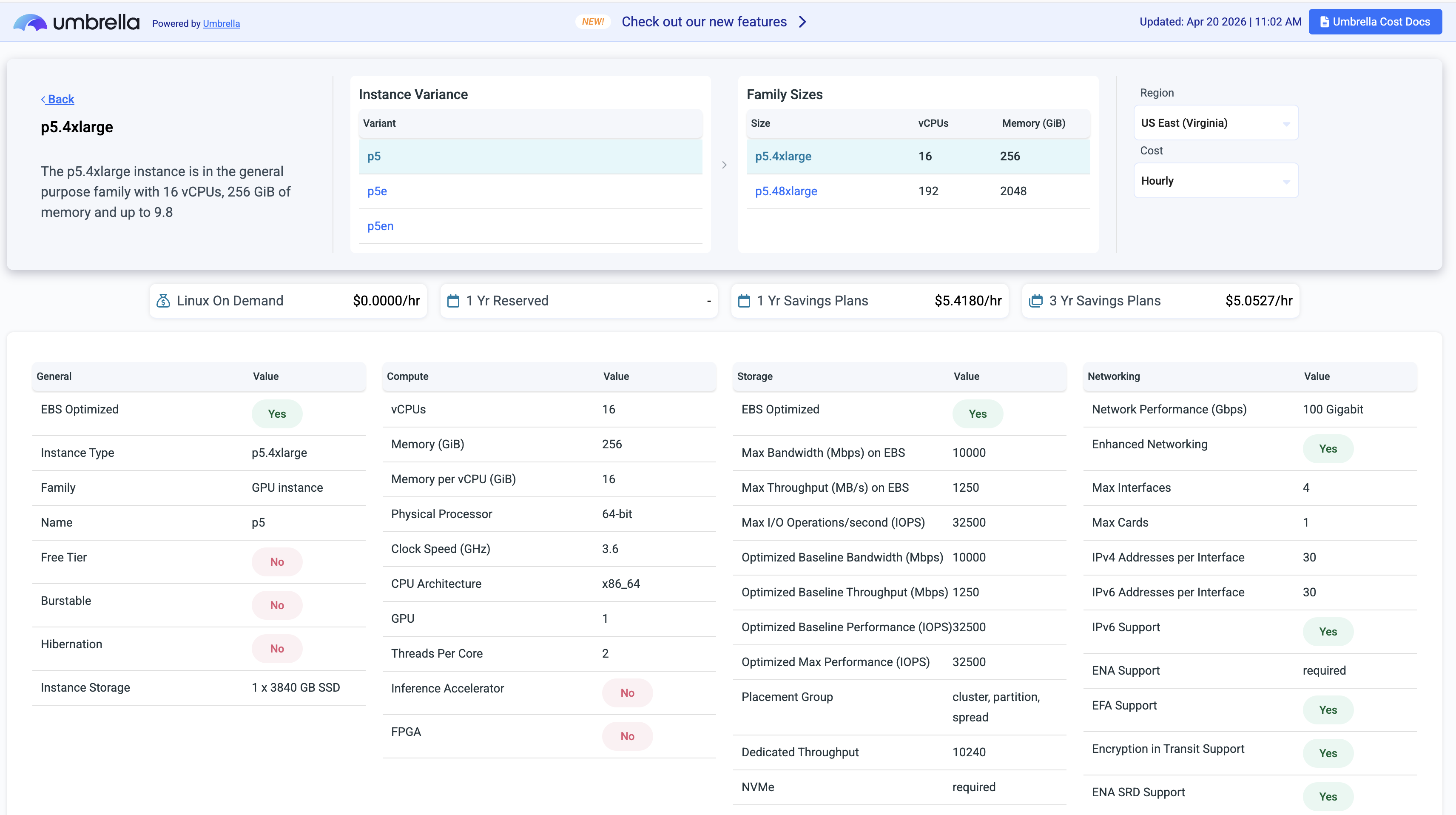
Clicking any instance row opens a detail view scoped to that specific instance, including:
- Full hardware specs: processor family/generation, architecture (Intel, AMD, Graviton/ARM), memory, local storage, and network throughput.
- A complete pricing matrix across all available models - on-demand, every reserved term and payment combination, and spot - for the selected region.
- For AWS RDS: engine-specific pricing, the price difference between Single-AZ and Multi-AZ deployments, and storage configuration options.
- Region availability.
- Pricing plans comparison.
- Regions comparison.
AWS Services
AWS offers the broadest service coverage on the Pricing Page, with six entries in the service selector:
| Service | Description |
|---|---|
| EC2 | Full range of compute instance families (general purpose, compute-optimized, memory-optimized, GPU, Graviton/ARM). Filter by processor architecture, generation, family type, OS, and pricing model. Spot price history available per instance type and availability zone. |
| RDS | Managed relational database instances. Adds filters for database engine (MySQL, PostgreSQL, Aurora, SQL Server, Oracle), deployment type (Single-AZ vs. Multi-AZ), and instance class. Multi-AZ pricing impact is shown explicitly. |
| ElastiCache | Managed in-memory caching instances (Redis / Memcached). Filter by node type and region, with on-demand and reserved pricing options. |
| Redshift | Data warehouse cluster node pricing. Filter by node type and region. Reserved tiers available for long-running analytical workloads. |
| OpenSearch | Managed search and analytics instances (Amazon OpenSearch Service). Browse instance types with on-demand and reserved pricing by region. |
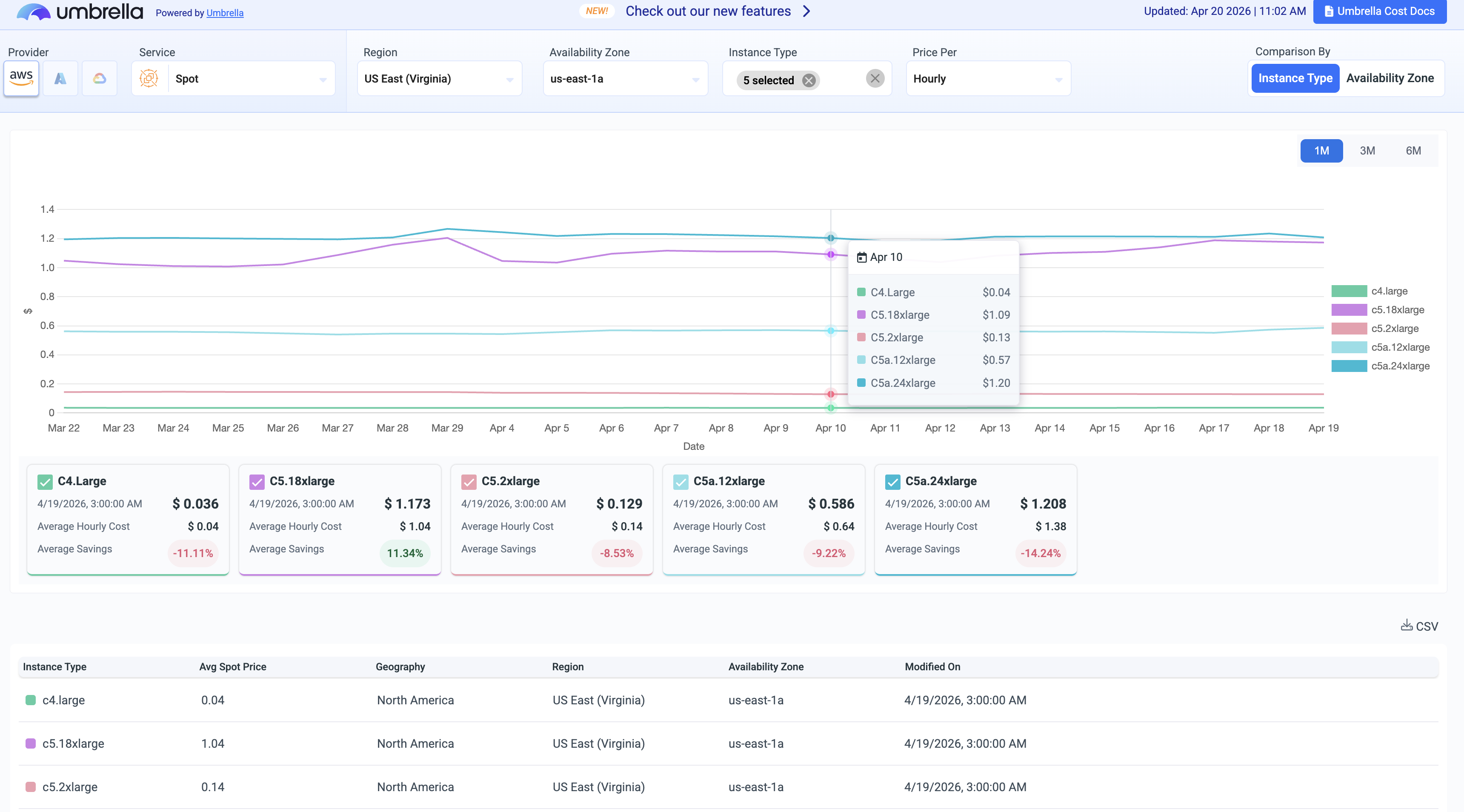
| Spot | Dedicated view for interruptible EC2 capacity. Shows current spot rates and historical price trends by instance type and availability zone - useful for identifying the most stable and cost-effective spot options for interrupt-tolerant workloads. |
AWS Spot Instance Pricing
The Pricing Page includes a dedicated Spot pricing view for interruptible capacity - available both as a filter within the EC2 service and as a standalone AWS service entry. For each instance type and availability zone, users can:
- View the current spot price alongside the on-demand rate and discount percentage.
- Track spot price history over time by instance type or availability zone.
The historical view helps identify which instance types and AZs offer the most stable and cost-effective spot capacity. This is especially useful for AWS, where spot prices change far more frequently than Azure or GCP.
Azure Capabilities
The Azure section covers Virtual Machine pricing across all major VM series (D-series, E-series, F-series, B-series, and others) across Azure's global regions. Pricing accounts for the Linux base rate, with Windows licensing reflected where applicable.
Commitment-based pricing reflects Azure Reserved VM Instances for 1-year and 3-year terms. The spot tier reflects Azure Spot VMs, which offer significant discounts with more predictable pricing changes than AWS.
GCP Capabilities
The GCP section covers Compute Engine machine types including standard, high-CPU, high-memory, and custom shapes across GCP's global regions. Pricing reflects Committed Use Discounts (CUDs) for 1-year and 3-year terms alongside on-demand rates.
GCP's spot tier (Preemptible / Spot VMs) is also surfaced. GCP spot prices change the least frequently of the three providers, making historical trends a reliable guide for workload planning.
Cross-Provider Comparison
While the tool scopes results to one provider at a time, it is designed to support cross-provider evaluation workflows. Common patterns include:
- Selecting equivalent compute configurations (e.g., 4 vCPU / 16 GiB RAM) across AWS, Azure, and GCP to compare effective on-demand and committed rates for the same workload.
- Identifying which provider offers the best spot discount for a given workload size and region.
- Evaluating whether a 1-year or 3-year commitment on one provider beats on-demand pricing on another.
- Comparing managed service pricing (e.g., AWS RDS vs. a self-managed VM on Azure or GCP) for database workloads.
Updated 6 months ago