
Fiscal Year Calander Configuration
LocationOrganization → Settings → Fiscal Calendar
Overview
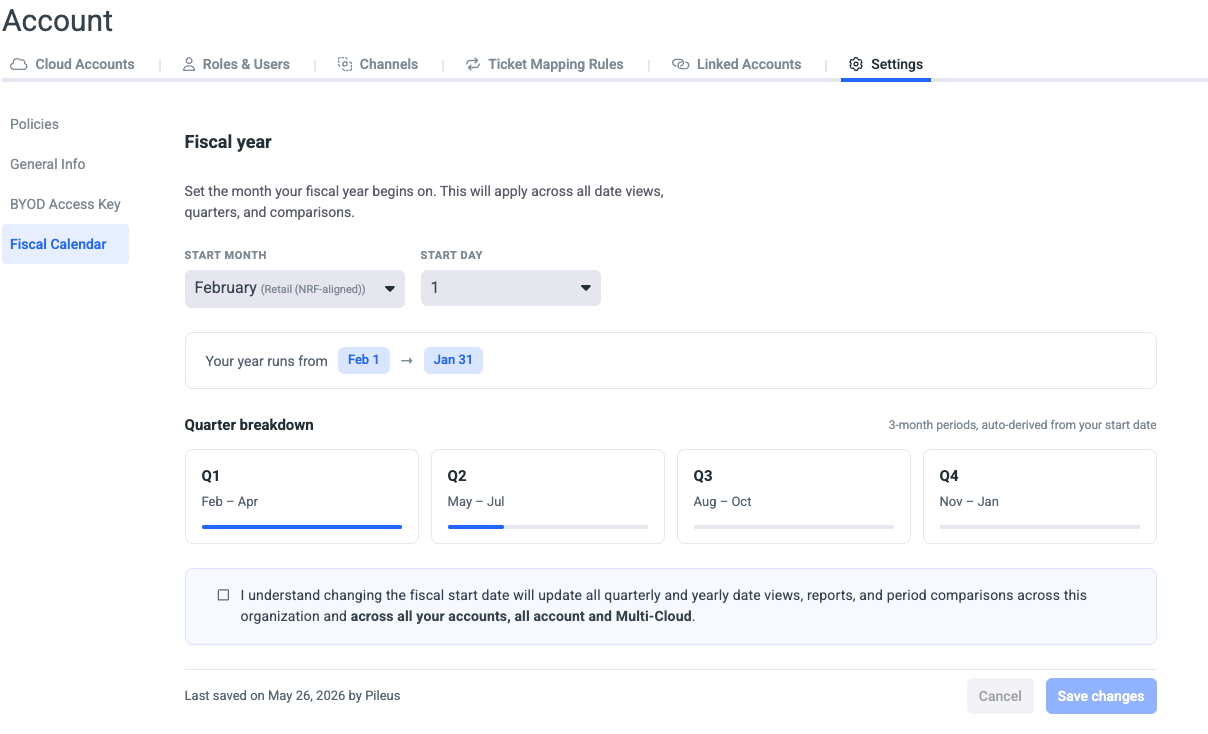
The Fiscal Calendar setting lets administrators define when their organization's fiscal year begins. Once configured, the chosen start date drives every quarterly and yearly view across Umbrella — quarters, period comparisons, and reporting ranges all re-align to the organization's accounting calendar instead of the default January–December calendar year.
Who can use it
Account administrators with the Organization Settings permission. Changes apply organization-wide.
What you configure
- Start Month: The month your fiscal year begins (January through December).
- Start Day: The day of the chosen month (1–31). The list adapts to the selected month's length, so February tops out at 29 and April at 30.
Confirmation is required before saving the changes

Affected entities
The changes will be applied in each Account, All Account and Multi-Cloud
When the fiscal start date changes, the following surfaces re-align their date ranges, quarters, and period comparisons:
-
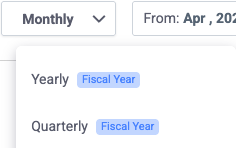
Cost & Usage Explorer/Assets: Once Quarterly or Yearly is selected in the granularity dropdown, indicate that the Fiscal Calendar is enabled.
-
Dashboards
-
Reports
-
Budget Summary
-
Waste Detector
-
My Commitments
Updated 4 months ago