
GCP Dates By: Usage Date vs. Invoice Month
Overview
GCP records two fundamentally different timestamps for every line of spend, and they don't always agree. The Dates by toggle lets you choose which one drives the chart, the totals, and the date filters:
- Usage Date - spend is placed when the resource was actually consumed. Use this for operational and engineering analysis: trends, anomaly detection, and consumption-based showback/chargeback.
- Invoice Month - spend is placed in the month Google billed it. Use this for financial reconciliation: matching the Explorer total to the invoice your finance team receives.
The two views can differ for the same date range. That's expected, and the rest of this section explains why.
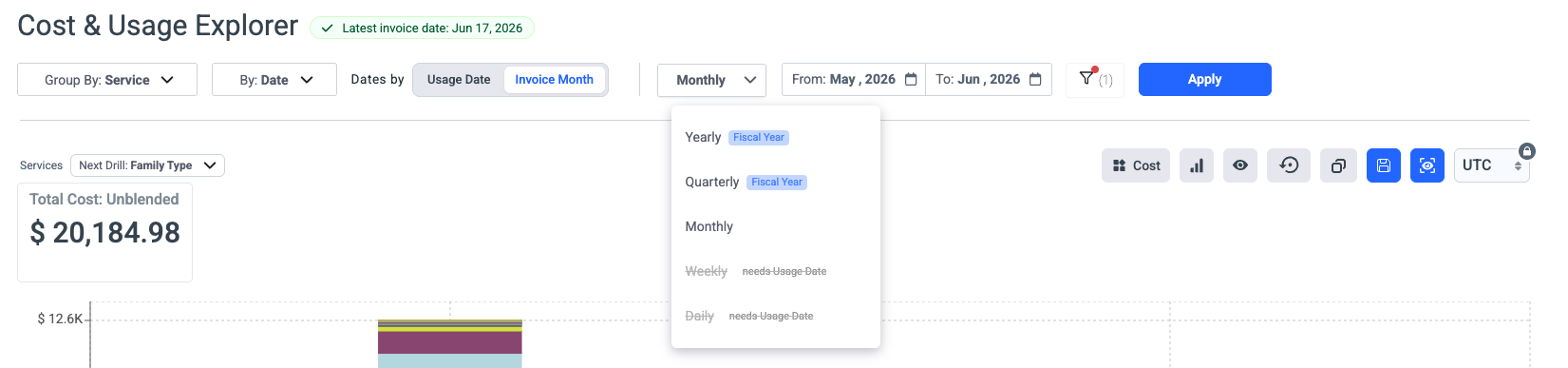
The 'Date By' control applies to Google Cloud (GCP) billing accounts. It lets you decide which clock the Cost & Usage Explorer uses to place spend on the timeline: the moment a resource was consumed, or the month Google invoiced it.
For historical months, Umbrella uses the usage month as the invoice month to prevent empty data. If historical 'invoice Month' data updates are required, please contact our support : [email protected]
Usage Date
Usage Date answers "when did we actually use this?" It maps to the usage_start_time of each usage record in the GCP BigQuery billing export.
Because consumption is timestamped at the resource level, Usage Date supports fine-grained granularity:
- Hourly - pinpoint when spend spiked within a day (deploys, batch jobs, runaway autoscaling).
- Daily - day-over-day trend and anomaly analysis.
- Weekly / Monthly / Quarterly / Yearly - higher-level rollups for the same underlying timestamps.
UTC / Pacific Time toggle
GCP stores usage timestamps in the export in UTC, but Google defines its billing day and invoice-month boundaries in Pacific Time (America/Los_Angeles). That mismatch means a UTC daily bucket won't line up with how Google itself counts a day.
The UTC / PST toggle (available only under Usage Date) controls where the day and hour boundaries fall:
- UTC - buckets align to the raw export timestamps.
- Pacific Time - buckets are shifted to match Google's own day/month boundaries, so your daily and hourly views reconcile cleanly against invoice-month logic.
TipIf you're investigating an anomaly and the spike lands "between" two days, switch the toggle to Pacific Time so your hourly view matches Google's billing clock. Note that Pacific Time also shifts with daylight saving (PST/PDT).
Invoice Month
Invoice Month answers "when were we billed for this?" It maps to the invoice.month field in the billing export, formatted as YYYYMM (for example, 202606).
This is the only view that reconciles to the PDF/CSV invoice your finance team receives from Google. Granularity here is monthly by definition - each row belongs to exactly one invoice month, so hourly/daily/weekly options don't apply.
Use Invoice Month for month-end close, accruals, and any conversation where the number has to match the official invoice.
Why Usage Date and Invoice Month diverge
For the same calendar range, the two views can show different totals. The drivers are all GCP-specific:
| Cause | Effect |
|---|---|
| Pacific Time boundaries | Usage near a month boundary (in UTC) can be invoiced in the adjacent month under Pacific Time. |
| Late-arriving usage | Some usage is finalized after the period closes and is assigned to the invoice month it settles in, not the day it ran. |
| Adjustments & corrections | Reruns, rerating, and rounding corrections post to an invoice month even though the underlying usage happened earlier. |
| Credits & discounts | Committed-use discounts, SUDs, and promotional credits are applied at invoice time and surface in the invoice-month view. |
This is exactly why both lenses exist: engineers reason in Usage Date (what ran, when), and finance reconciles in Invoice Month (what Google charged, when).
Reconciling to your GCP invoice
To match the official Google invoice for a given month, view by Invoice Month and confirm the total reflects cost plus credits for that invoice.month:
SELECT
  invoice.month AS invoice_month,
  SUM(cost)
    + SUM(IFNULL((SELECT SUM(c.amount) FROM UNNEST(credits) c), 0))
    AS total_billed
FROM `PROJECT.DATASET.gcp_billing_export_v1_BILLING_ACCOUNT_ID`
WHERE invoice.month = '202606'
GROUP BY invoice_month;
If the Usage Date total for "June" doesn't match this figure, that's the divergence described above — not a data error. Switch to Invoice Month to reconcile.
Quick reference
| Usage Date | Invoice Month | |
|---|---|---|
| Question it answers | When was it consumed? | When were we billed? |
| Granularity | Hourly → Yearly | Monthly only |
| Export field | usage_start_time | invoice.month |
| Best for | Trends, anomalies, engineering showback | Reconciliation, month-end close, finance |
| Matches the official invoice? | Not necessarily | Yes |
Updated 3 months ago