
Anthropic
Overview
Umbrella Cost connects directly to Anthropic so your Claude spend lands in the same reports, dimensions, budgets, and anomaly alerts as your cloud cost. There are two connection types and you choose one:
- Claude API (Anthropic Platform), for programmatic API spend by project, model, and operation.
- Claude.ai (Anthropic Enterprise) for per-user seat and product spend across Chat, Claude Code, and Cowork using the analytics API.
AI spend usually arrives as a single invoice line with no attribution, so it sits outside every allocation model you already trust. Connecting Anthropic gives you request-level and user-level detail you can slice by user, product, or API Key.
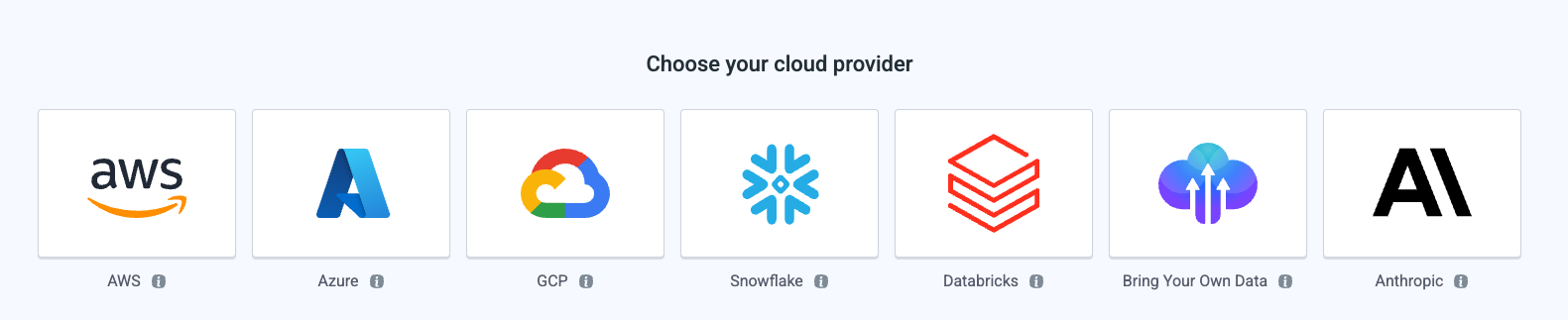
Which connection type to choose
Only one Anthropic connection type is supported at a time.
| Item | Claude API | Claude.ai |
|---|---|---|
| Source | platform.claude.com Usage and Cost API | claude.ai Analytics API |
| Credential | Admin API Key (sk-ant-admin...) plus Organization ID | Analytics API Key (read:analytics scope) |
| Role required | Anthropic organization member with the Admin role | Primary Owner of the Claude.ai organization |
| What you get | Cost by project and model, operations breakdown (messages, batches, and so on), input / output / cache tokens | Cost per individual user, product (Chat, Claude Code, Cowork), model, context window |
| History on first sync | Full account history | Up to 12 months |
| Data latency | Within 24 hours | Within 24 hours |
| Plans | Pay-as-you-go, Team, Enterprise (any plan with API Console access) | Enterprise with analytics provisioned by Anthropic |
| Seat contract support | Not applicable (usage-based) | Yes |
Plan compatibility at a glance:
| Plan | Claude API | Claude.ai |
|---|---|---|
| Enterprise + API | Yes | Yes |
| Team + API | Yes | - |
| Pay-as-you-go | Yes | - |
| Enterprise (seats) | - | Yes |
| Pro / Max / Free | - | - |
The two sources do not overlap
- Claude API covers API usage (projects, models, operations).
- Claude.ai covers product usage (per-user Chat, Claude Code, and Cowork). Filter by the Cloud Provider dimension in Explorer to isolate either one.
Prerequisites
- For Claude API: Admin role in your Anthropic organization. Only Admins can create Admin keys. If you do not see the Admin Keys section, ask your org admin to create the key or grant you the role.
- For Claude.ai: Primary Owner of the Claude.ai organization, on an Enterprise plan with analytics provisioned by Anthropic. If
claude.ai/analytics/api-keysis unreachable or key creation fails with "analytics not enabled," contact Anthropic Support to enable Enterprise analytics for your organization. - The customer or organization the account will be onboarded to already exists in Umbrella Cost.
Data Refresh
Anthropic reports usage data at hourly granularity, while cost data is available at daily granularity. Claude API Data Availability & Freshness
How fresh and how granular the data is depends on the provider.
| Provider | Cost granularity | Usage granularity | Data Freshness |
|---|---|---|---|
| Anthropic | Daily | Hourly | Usage: 4-24 hours Cost: ~1 day Claude API Data Availability & Freshness |
Backfill
When adding a new integration, the system automatically runs a backfill from January 1, 2026, or one year back, whichever is earlier.
No additional backfill run is required.
Step 1: Account details
| Field | What it is | Where to find it |
|---|---|---|
| Onboard this BYOD account to | A customer or My organization. Determines who owns the connection. | - |
| Customer Name | Shown only when A customer is selected. Select the existing customer. | Your Umbrella Cost customer list |
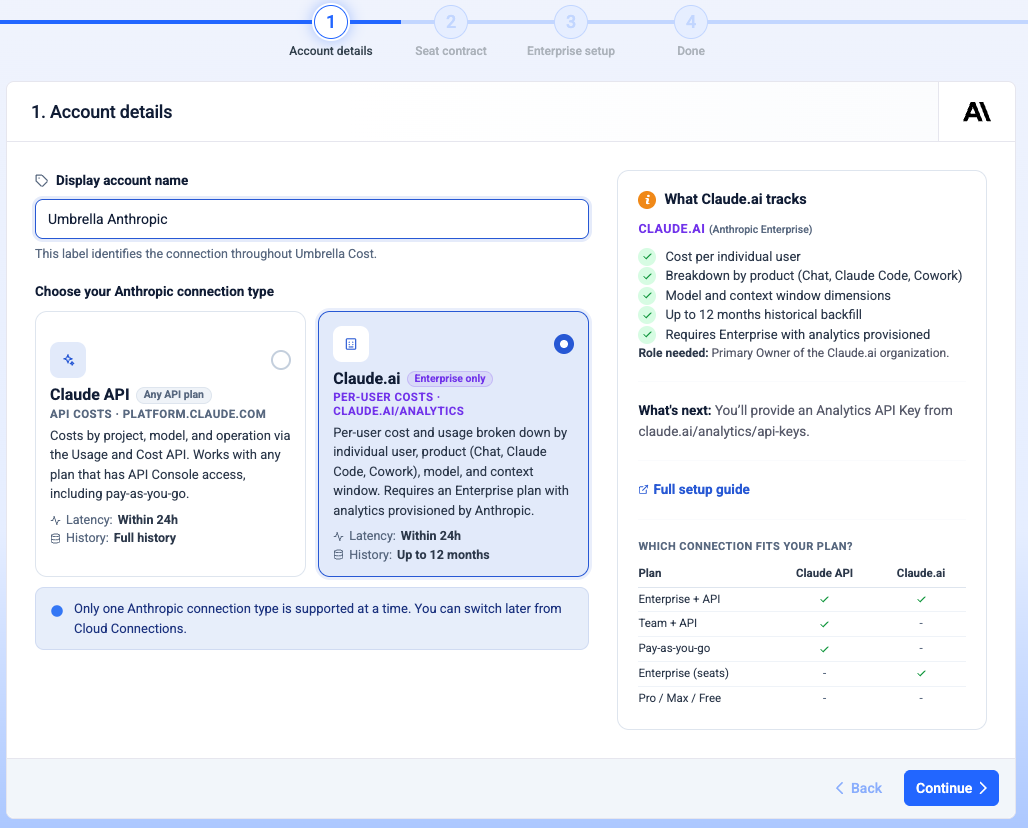
| Display account name | "This label identifies the connection throughout Umbrella Cost." | You choose it, for example Acme Anthropic |
| Anthropic connection type | Claude API or Claude.ai. See the comparison above. | - |
Select a connection type and enter a display account name, then click Continue. The right-hand help panel updates to show what the selected type tracks, the role required, and the plan compatibility table.
One type at a timeSelecting a connection type replaces the other. The wizard branches from here: Claude.ai adds a Seat contract step, Claude API goes straight to setup.
Step 2: Seat contract (Claude.ai only)
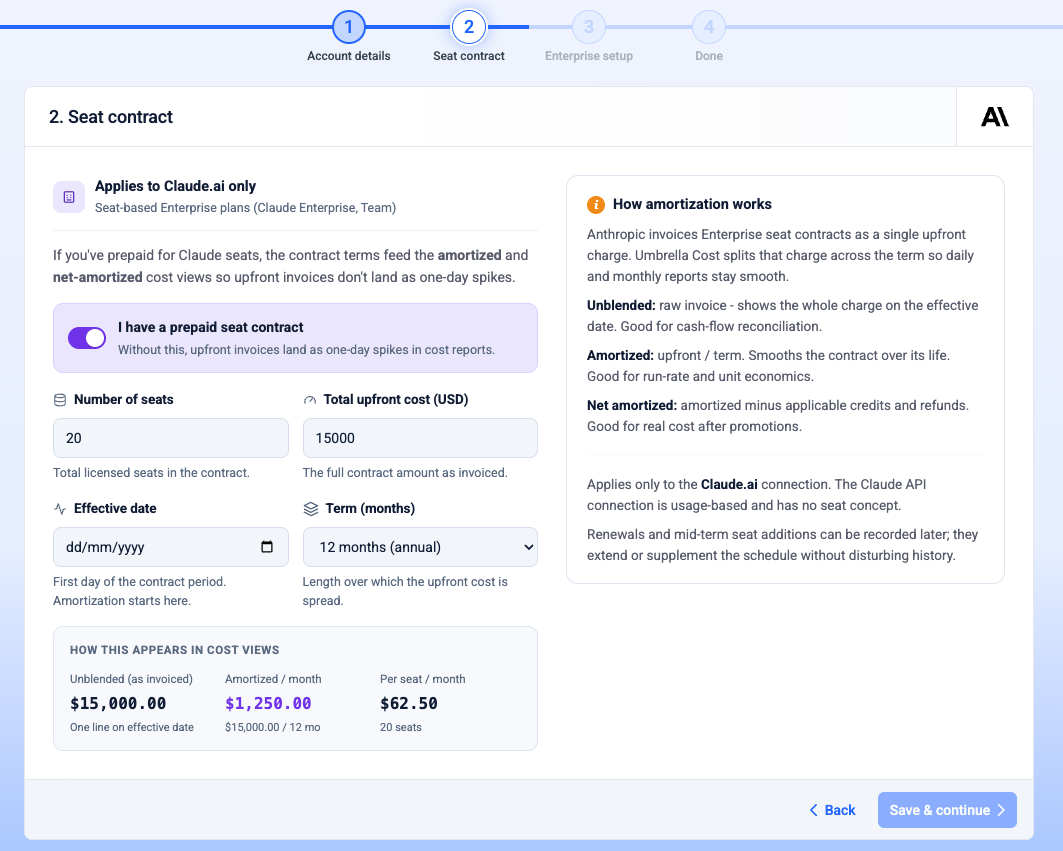
Optional, and applies to seat-based plans only. If you have prepaid for Claude seats, record the terms so amortized and net-amortized cost views reflect true monthly burn instead of a one-time bill spike.
Turn on I have a prepaid seat contract, then complete:
| Field | What it is | Notes |
|---|---|---|
| Number of seats | Total licensed seats in the contract. | - |
| Total upfront cost (USD) | The full contract amount as invoiced. | - |
| Effective date | First day of the contract period. Amortization starts here. | - |
| Term (months) | Length over which the upfront cost is spread. | 1, 6, 12, 24, or 36 months |
A How this appears in cost views panel previews three figures as you type: unblended (as invoiced, one line on the effective date), amortized per month (upfront / term), and per seat per month (amortized / seats).
How the cost views differ:
- Unblended : the raw invoice, showing the whole charge on the effective date. Use it for cash-flow reconciliation.
- Amortized: upfront divided by term, smoothed over the contract life. Use it for run-rate and unit economics.
- Net amortized amortized minus applicable credits and refunds. Use it for real cost after promotions.
If your Enterprise usage is metered or you have no seat commitment, click Skip - no contract. You can add a contract later from Settings -> Commitments. Renewals and mid-term seat additions can be recorded later; they extend or supplement the schedule without disturbing histry.
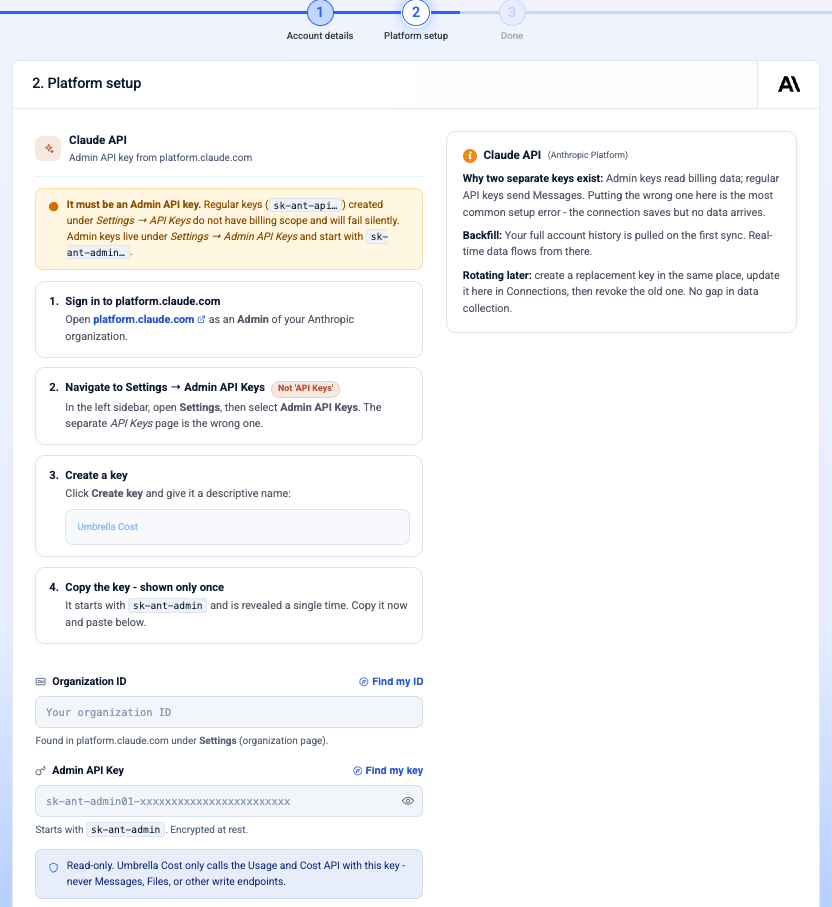
Step 3a: Set up Claude API
It must be an Admin API keyRegular keys (
sk-ant-api...) do not have billing scope and will fail silently: the connection saves but no data arrives. Admin keys start withsk-ant-admin.... This is the most common setup error.
- Sign in to platform.claude.com as a member with the Admin role in your Anthropic organization, not a personal account.
- Open API Keys, expand the section, and select Admin Keys. There is a separate page for regular API keys - that is the wrong page.
- Click Create Admin Key and give it a descriptive name, for example
Umbrella Cost. - Copy the key immediately. It starts with
sk-ant-adminand Anthropic reveals it only once.
Then complete the fields in Umbrella Cost:
| Field | What it is | Where to find it |
|---|---|---|
| Organization ID | Starts with org_. Also used as the Linked Account identifier in Umbrella Cost. | platform.claude.com -> Settings -> your organization overview page. Direct link: platform.claude.com/settings/organization |
| Admin API Key | Starts with sk-ant-admin. Encrypted at rest. | platform.claude.com -> API Keys -> Admin Keys |
Both fields offer a Find my ID / Find my key link that opens step-by-step help in the right-hand panel. The Admin API Key field validates the prefix inline and warns if you paste a regular sk-ant-api... key.
Click Create connection.
Read-only accessUmbrella only calls the Usage and Cost API with this key. It never calls Messages, Files, or any other write endpoint.
This is the organization-level IDNot a workspace or project ID. If you belong to multiple organizations, confirm you have selected the correct one in the org switcher.
Rotating the key later: create a replacement key in the same place, update it in Cloud Connections, then revoke the old one. There is no gap in data collection.
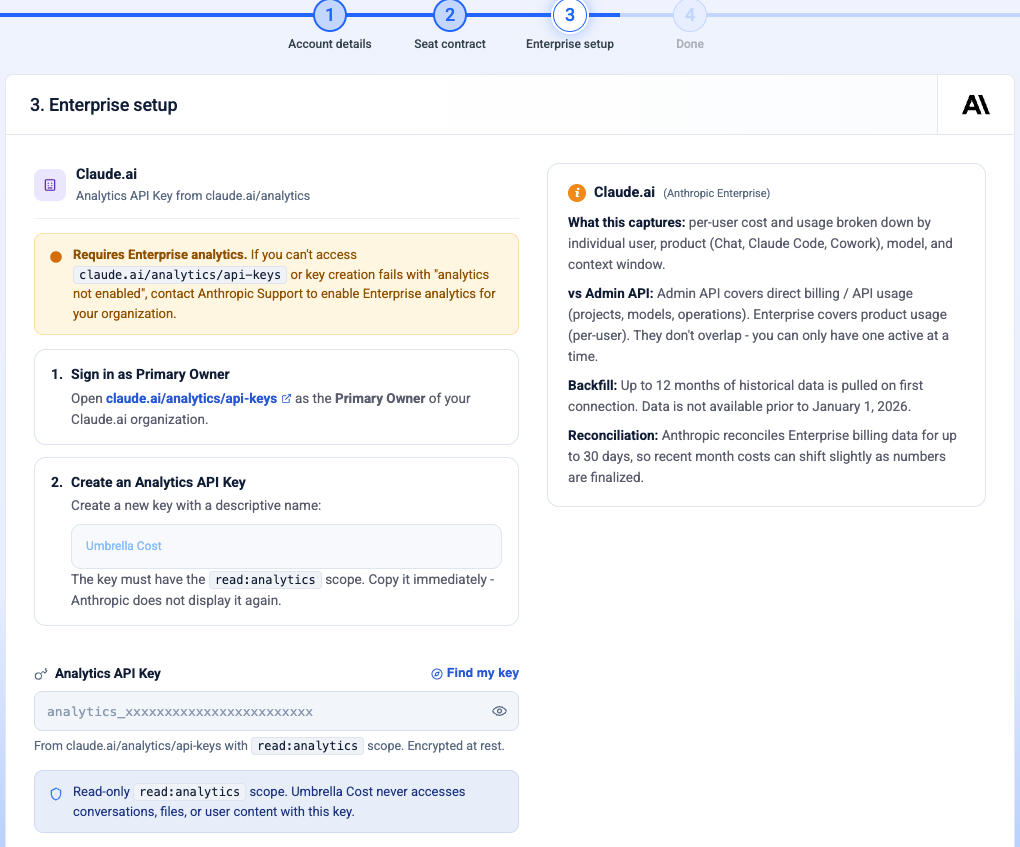
Step 3b: Set up Claude.ai
Requires Enterprise analyticsIf you cannot reach
claude.ai/analytics/api-keys, or key creation fails with "analytics not enabled," contact Anthropic Support to enable Enterprise analytics for your organization. Only the Primary Owner can create these keys.
- Sign in to
claude.ai/analytics/api-keysas the Primary Owner of your Claude.ai organization. - Click Create new key, name it (for example
Umbrella Cost), and confirm theread:analyticsscope is selected. Copy the key immediately - Anthropic does not display it again.
Then complete the field in Umbrella Cost:
| Field | What it is | Where to find it |
|---|---|---|
| Analytics API Key | Must carry the read:analytics scope. Encrypted at rest. | claude.ai -> Analytics -> API keys |
The field warns you if you paste an Admin API Key from platform.claude.com by mistake - it is a different credential entirely.
Click Create connection.
Read-only analytics scopeUmbrella Cost never accesses conversations, files, or user content with this key.
Step 4: What happens after you connect
The connection is created with status Pending Data and flips to Healthy once the first ingest completes. Costs appear within 24 hours.
Backfill and accuracy by type:
-
Claude API - full account history is pulled on the first sync, then real-time data flows from there.
-
Claude.ai - up to 12 months of history is pulled on first connection. Data is not available prior to January 1, 2026. Anthropic reconciles Enterprise billing for up to 30 days, so recent-month costs can shift slightly as numbers are finalized.
Once the data is processing continue to the next actions: -
Explore Anthropic spend - break down cost by model, user, and project in Explorer.
-
Build a business mapping - organize spend by team, product, or environment.
-
Create a budget - cap monthly Anthropic spend by team or product.
Troubleshooting
| Symptom | Cause | Resolution |
|---|---|---|
| Connection saves but no cost data arrives | A regular API key (sk-ant-api...) was used instead of an Admin key. Regular keys have no billing scope and fail silently. | Create an Admin key under API Keys -> Admin Keys and update the connection. |
| Admin Keys section is not visible | The signed-in user does not have the Admin role. | Ask an org admin to create the key or grant you the Admin role. |
| Analytics key creation fails with "analytics not enabled" | Enterprise analytics is not provisioned for the organization. | Contact Anthropic Support to enable it. |
claude.ai/analytics/api-keys is not reachable | Not signed in as Primary Owner, or analytics is not provisioned. | Sign in as Primary Owner; if it still fails, contact Anthropic Support. |
| Analytics key rejected as an Admin key | An sk-ant-admin... key was pasted into the Claude.ai connection. | Create an Analytics API Key at claude.ai/analytics/api-keys instead. |
| No Claude.ai data before January 2026 | Expected. Analytics data does not exist prior to January 1, 2026. | None. |
| Recent-month Claude.ai costs changed after ingest | Anthropic reconciles Enterprise billing for up to 30 days. | Expected. Costs settle as Anthropic finalizes. |
| Organization ID rejected | A workspace or project ID was used instead of the organization ID. | Copy the org_ value from platform.claude.com/settings/organization. |
| Prepaid seat contract appears as a one-day spike | No seat contract recorded, so the invoice is only represented unblended. | Add the contract from Settings -> Commitments and use amortized views. |
Updated about 2 months ago