
GitHub Copilot
Overview
Connect a GitHub Copilot organization or enterprise to Umbrella and get Copilot seat, usage, and billing data in the same views as your cloud spend - cost per user, seat utilization, completions and chat usage, AI credit consumption, and IDE/language breakdown.
Two connection types are supported:
- Copilot Business - one organization at a time, via a classic PAT with
manage_billing:copilotandread:orgscopes. - Copilot Enterprise - all organizations under a GitHub Enterprise Cloud account in one connection, via a classic PAT with
manage_billing:copilotandread:enterprisescopes.
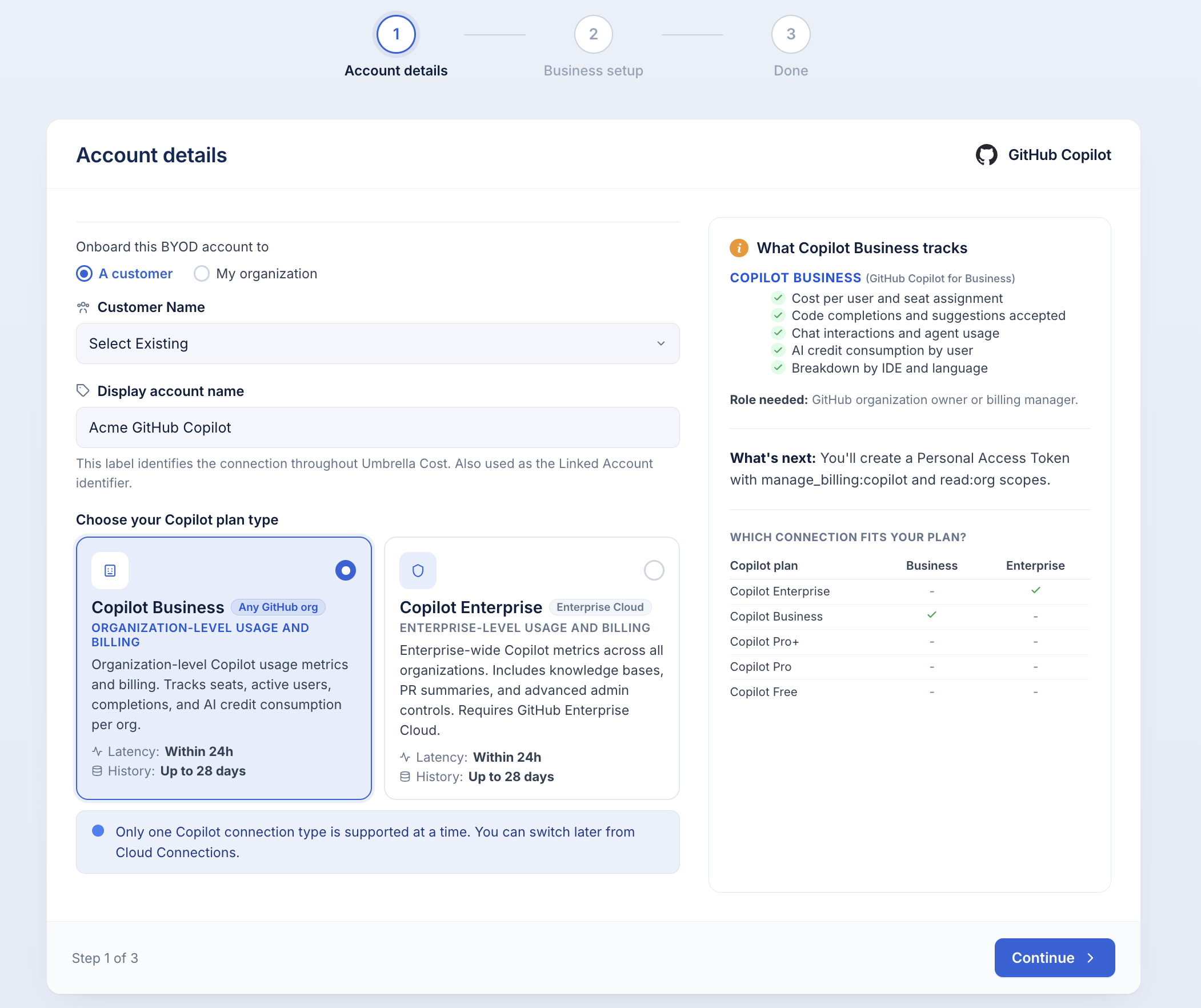
Only one Copilot connection type is supported per environment at a time. You can switch later from Cloud Connections.
Why it matters
Copilot bills through GitHub's seat model separately from your cloud providers, and its usage lives in GitHub's Metrics API. Connecting brings that spend and adoption data into Umbrella so you can measure return on your Copilot investment alongside every other line of cost - break it out by team, product, or business unit, and set anomaly alerts on Copilot spend the same way you would for AWS or Azure.
What Umbrella reads
Umbrella calls two read-only GitHub APIs:
- Copilot Metrics API - seats, active users, completions, chat, agent activity, IDE and language breakdown, AI credit consumption.
- Copilot Billing API - per-seat billing data.
Nothing is written back to your GitHub environment. Umbrella never accesses repository contents, issues, pull requests, or organization settings.
Which Copilot plan is supported
| Copilot plan | Business connection | Enterprise connection |
|---|---|---|
| Copilot Enterprise | - | Yes |
| Copilot Business | Yes | - |
| Copilot Pro+ | - | - |
| Copilot Pro | - | - |
| Copilot Free | - | - |
Copilot Pro, Pro+, and Free plans are not supported - they don't expose the billing and org-level metrics APIs Umbrella needs.
Before you start
- For Copilot Business: GitHub organization owner or billing manager access.
- For Copilot Enterprise: GitHub enterprise owner or billing manager access, plus a GitHub Enterprise Cloud subscription.
- Ability to create a classic Personal Access Token on your GitHub account. Fine-grained tokens are not supported by the Copilot billing API.
Step 1: Account details
Open Cloud Connections → Add connection → GitHub Copilot to launch the wizard.
| Field | What it is |
|---|---|
| Onboard this BYOD account to | Choose A customer (then pick the customer name) or My organization. |
| Display account name | The label this connection carries in Umbrella. Also used as the Linked Account identifier (e.g. Acme GitHub Copilot). |
| Copilot plan type | Choose Copilot Business or Copilot Enterprise. |
Click Continue.
The rest of the wizard depends on the plan type you chose. Follow the matching section below.
Copilot Business setup
Create the Personal Access Token
- Sign in to GitHub. Open github.com/settings/tokens as an organization owner or billing manager.
- Generate a classic PAT. Click Generate new token (classic). Give it a descriptive name (e.g.
Umbrella Cost - Copilot) and set an expiration - 90 days is a reasonable default, then rotate before expiry. - Select the required scopes:
manage_billing:copilot- read Copilot billing data.read:org- read organization membership and teams.
- Copy the token. It starts with
ghp_and is revealed only once. Copy it now.
Must be a classic PATFine-grained tokens do not support the
manage_billing:copilotscope. Do not use "Generate new token (fine-grained)" - the connection will fail authentication.
Fill in the connection fields
| Field | Value | Where to find it |
|---|---|---|
| Organization slug | Your org's URL slug | The name at the end of github.com/orgs/YOUR-ORG. Case-sensitive; orgs with spaces in their display name use hyphens. |
| Personal Access Token (classic) | The ghp_... token from the step above | Encrypted at rest by Umbrella. |
Click Create connection.
Copilot Enterprise setup
Enterprise onboarding has one extra step - an optional seat contract - between account details and PAT setup.
Enterprise seat contract (optional)
If you've prepaid for Copilot Enterprise seats (annual or multi-year commitment), enter the terms so amortized and net-amortized cost views reflect the true monthly burn instead of a one-time bill spike.
Enable I have a prepaid seat contract and fill in:
| Field | What it is |
|---|---|
| Number of seats | Total licensed Copilot seats in the contract. |
| Total upfront cost (USD) | The full contract amount as invoiced. |
| Effective date | First day of the contract period. Amortization starts here. |
| Term (months) | Length over which the upfront cost is spread. Options: 1, 6, 12, 24, 36 months. |
The panel previews how the contract appears in cost views:
- Unblended - the raw invoice as a single charge on the effective date.
- Amortized -
upfront / term, smoothed across the contract's life. - Per seat / month - amortized cost divided by number of seats.
Skip this step if Copilot is billed monthly per seat without an upfront commitment. You can add a contract later from Settings → Commitments.
Enterprise onlyThe seat contract step only applies to Copilot Enterprise with upfront seat commitments. Monthly-billed Copilot Business does not need it.
Create the Personal Access Token
- Sign in to GitHub. Open github.com/settings/tokens as an enterprise owner or billing manager.
- Generate a classic PAT. Click Generate new token (classic). Name it (e.g.
Umbrella Cost - Copilot Enterprise) and set an expiration. - Select the required scopes:
manage_billing:copilot- read Copilot billing data.read:enterprise- read enterprise membership and metrics.
- Copy the token. It starts with
ghp_and is revealed only once.
Enable the usage metrics policyIn your enterprise settings, the Copilot usage metrics policy must be set to Enabled everywhere for the Metrics API to return data. If the policy is off, the connection will authenticate but no usage will appear.
Fill in the connection fields
| Field | Value | Where to find it |
|---|---|---|
| Enterprise slug | Your enterprise's URL slug | Found at github.com/enterprises/YOUR-ENTERPRISE. Lowercase with hyphens. If you use GitHub Enterprise on GHE.com, use your subdomain. |
| Personal Access Token (classic) | The ghp_... token from the step above | Encrypted at rest by Umbrella. |
Click Create connection.
After you connect
The connection first appears in Pending Data state and flips to Healthy once the first ingest completes - typically within 24 hours. Umbrella pulls up to 28 days of historical metrics on first connection; after that, usage refreshes daily.
From here you can:
- Explore Copilot spend in the Cost & Usage Explorer, broken down by user, team, or model.
- Build a dimension to organize spend by engineering team or product group.
- Enable anomaly alerts on Copilot spend against baseline.
- Track adoption through seat utilization and AI credit consumption trends.
Token rotation
Classic PATs expire on the date you set at creation. To avoid data gaps:
- Create a replacement token in GitHub with the same scopes before the current one expires.
- Update the token in Umbrella under Cloud Connections → [your connection] → Edit.
- Revoke the old token in GitHub.
Set a calendar reminder for a few days before expiry so you have time to rotate cleanly.
Troubleshooting
Authentication fails immediately. Confirm you used a classic PAT, not a fine-grained one. Fine-grained tokens don't carry the manage_billing:copilot scope. Regenerate and re-enter.
No usage data appears (Enterprise). Check the Copilot usage metrics policy in your enterprise settings - it must be Enabled everywhere for the Metrics API to return data.
Wrong slug. Organization and enterprise slugs are case-sensitive and use hyphens for spaces. Copy them from the GitHub URL rather than typing them.
Missing billing scope. Regenerate the PAT and check both scopes explicitly - manage_billing:copilot is easy to miss because it's grouped under a collapsed section on GitHub's token screen.
Updated about 2 months ago